
Download Voice Design AI – Advanced Text‑to‑Speech, Voice Cloning & Emotion‑Aware Synthesis
Overview
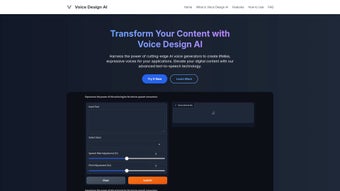
Voice Design AI is a cutting‑edge web‑based application that leverages deep‑learning models to turn ordinary text into lifelike speech. Aimed at developers, podcasters, game designers, and any creator who needs high‑quality audio, the platform combines Natural Language Processing (NLP), emotion recognition, and multi‑language support into a single, easy‑to‑use interface. Whether you’re producing an audiobook, building a virtual assistant, or adding dialogue to a video game, Voice Design AI provides a secure, subscription‑based environment where you can generate, edit, and export voice content with just a few clicks. The service also offers a powerful API for real‑time integration, enabling developers to embed realistic voice output directly into apps, chatbots, or interactive installations. With voice cloning from short samples, customizable pitch, speed, and timbre controls, plus real‑time processing for live interactions, the tool stands out as a versatile, future‑proof solution for anyone looking to add authentic human‑like speech to their projects.
Core Features That Set Voice Design AI Apart
- Natural Language Understanding: Advanced NLP interprets context, punctuation, and syntax to deliver natural intonation and pauses.
- Emotion‑Aware Synthesis: Choose from happiness, sadness, excitement, or neutral tones; the engine modulates prosody to match the desired feeling.
- Multi‑Language Library: Supports over 30 languages and dialects, each with region‑specific phonetics for authentic output.
- Voice Cloning: Upload a short 30‑second sample and create a custom voice model that mimics the speaker’s timbre and style.
- Real‑Time Processing: Stream text and receive instant audio, ideal for interactive chatbots and live narration.
- Extensive Parameter Controls: Adjust pitch, speed, volume, breathiness, and articulation to fine‑tune the final sound.
- API & SDK Integration: RESTful API with comprehensive documentation; SDKs for JavaScript, Python, and C# simplify embedding.
- Secure Cloud Storage: All generated audio files are encrypted at rest and in transit, complying with GDPR and ISO‑27001 standards.
- Batch Processing & Queue Management: Upload CSV or JSON lists for bulk conversion; the system queues jobs and notifies via webhook.
- Regular Model Updates: Monthly releases improve voice realism, add new languages, and refine emotion mapping.
Installation, Usage & Compatibility
Voice Design AI is a pure SaaS solution, so there is no traditional installation required. Simply visit the official website, create an account, and select the subscription tier that matches your volume needs. After confirming your email, you’ll be directed to a clean dashboard where you can start typing or uploading text files. For developers, the API key is generated on the “Developer” tab; copy it into your application’s header and begin sending POST requests to https://api.voicedesign.ai/v1/synthesize. The platform provides sample code snippets for popular languages, making the learning curve shallow.
Because the service runs entirely in the cloud, it is compatible with any operating system that has a modern web browser—Windows 10/11, macOS Monterey and later, Linux distributions, as well as mobile platforms such as Android 12 and iOS 16. The web UI is responsive, allowing you to generate and preview audio on tablets or smartphones without losing functionality. If you prefer a local workflow, the API can be called from desktop applications built with Electron, .NET, or Java, ensuring seamless integration across Windows, macOS, and Linux environments.
The typical usage flow is straightforward: 1) Choose a voice or upload a cloning sample, 2) Enter or paste the script, 3) Select language and emotional tone, 4) Tweak optional parameters, and 5) Click “Generate.” The resulting waveform appears in the preview pane, where you can listen, download as MP3/WAV, or send directly to cloud storage (Amazon S3, Google Cloud, or Azure). For batch jobs, navigate to the “Batch” tab, upload a CSV with columns for text, language, and emotion, and let the system handle the rest. Notifications are sent via email or webhook when processing completes, keeping your workflow uninterrupted.
Pros, Cons, Frequently Asked Questions & Final Thoughts
Pros
- High‑fidelity, emotion‑aware speech that rivals human narrators.
- Voice cloning from minimal samples saves time and licensing costs.
- Broad language support and flexible parameter controls.
- Robust API and SDKs for seamless integration into existing pipelines.
- Secure, GDPR‑compliant cloud storage with encrypted data transfer.
Cons
- Subscription pricing may be steep for occasional hobbyists.
- Real‑time processing latency can vary based on server load.
- Voice cloning requires a clear, high‑quality sample; noisy recordings reduce accuracy.
- No on‑premise deployment option for ultra‑sensitive environments.
- Advanced features (batch queue, custom emotions) are limited to higher‑tier plans.
FAQ
Can I use Voice Design AI for commercial projects?
Yes. All subscription tiers include a commercial usage license, allowing you to embed generated audio in apps, videos, games, and marketing materials without additional royalties.
How much text can I synthesize in a single request?
The API accepts up to 5,000 characters per request for real‑time calls. For larger scripts, use the batch endpoint, which processes files up to 50 MB.
Is there a free trial available?
A 7‑day free trial is offered with a credit of 5,000 characters. No credit‑card information is required, and you can cancel anytime before the trial ends.
What file formats can I export?
Audio can be downloaded as MP3 (128‑320 kbps) or lossless WAV (44.1 kHz, 16‑bit). The API also supports direct streaming to cloud storage in these formats.
How secure is my data?
All data is encrypted using TLS 1.3 during transmission and AES‑256 at rest. The service complies with GDPR, CCPA, and ISO‑27001, ensuring that both your text and generated audio remain private.
Conclusion & Call to Action
Voice Design AI delivers a professional‑grade text‑to‑speech engine that combines emotional nuance, multi‑language capabilities, and a flexible API—all within a secure, cloud‑first platform. While the subscription cost may be a consideration for occasional users, the quality of output, ease of integration, and robust feature set make it a compelling choice for businesses and creators who demand realistic voice synthesis at scale. Ready to give your projects a natural, expressive voice? Sign up for the free trial today and experience the future of AI‑driven audio creation.



.png)



